crew 5.0.0
Voice OS: talk to your coding agents. crew has given every piece of work its own copy of your
stack: git worktrees, dev servers on stable ports, services pointed at each other. 5.0 puts a voice
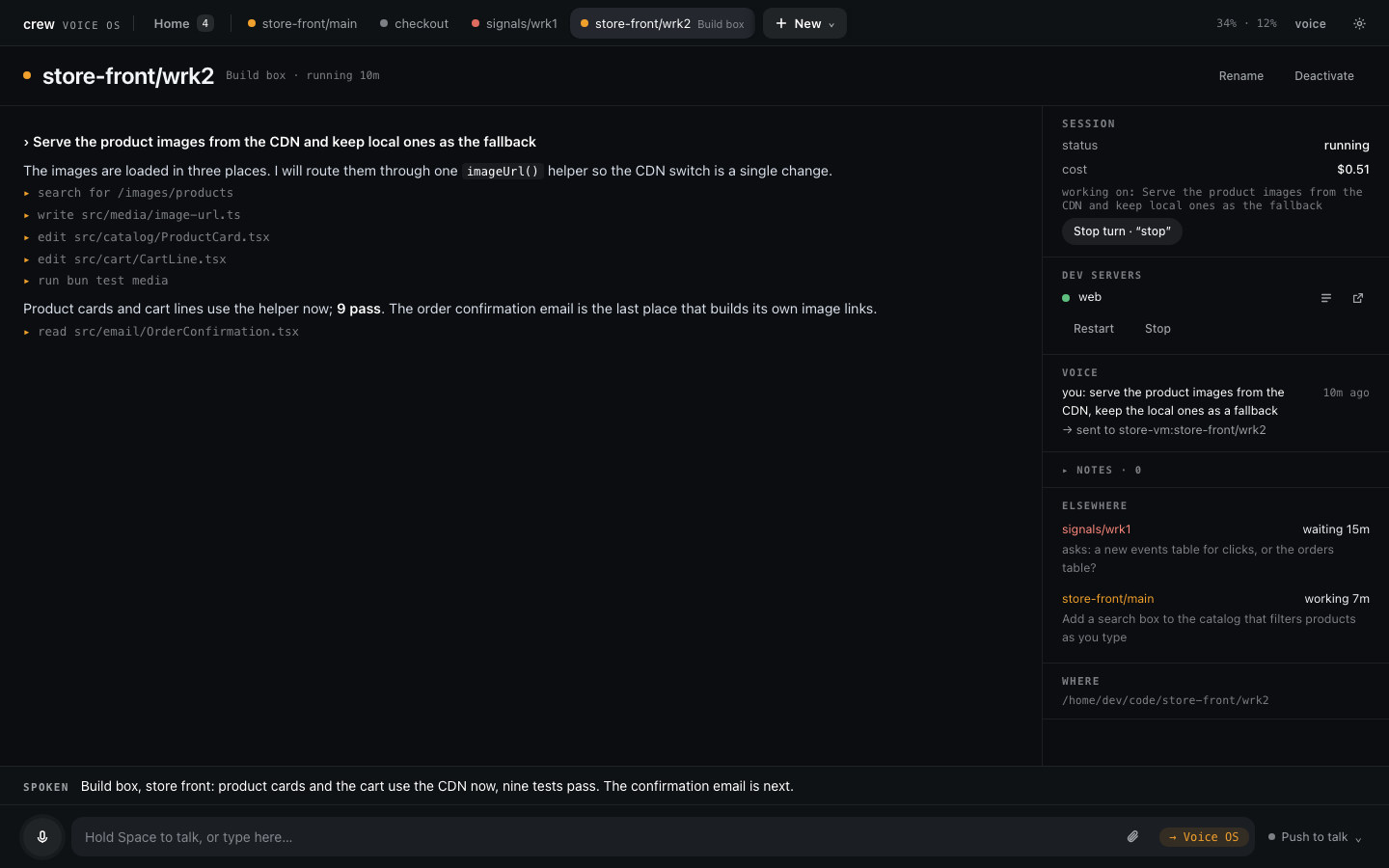
on top. crew voice opens a cockpit in your browser that runs one Claude Code session per
worktree, and you drive them all by talking: "tell checkout to run the tests", "what's waiting on
me?", "yes, but only on staging".
Upgrading
crew update    # crew 5.0.0
crew voice     # downloads Voice OS, asks for its two API keys, opens it in your browser
The first crew voice checks for tmux and Claude Code, downloads the Voice OS build that matches
your crew (25–40 MB), and asks for an Anthropic key and a Soniox key. It checks each key with its
service before saving it, owner-only, in ~/.config/crew-voiceos/. After that, crew update keeps
both current. Nothing about your projects, workspaces or worktrees changes.
Coming from 4.x without gh? 5.0's crew update no longer needs gh, but the 4.x binary
you're updating from still asks GitHub through gh api. If crew update fails for that reason,
re-run the install script instead:
curl -fsSL https://raw.githubusercontent.com/FurlanLuka/crew/main/install.sh | sh
os is now a reserved workspace name. Voice OS registers its dev-proxy route and tmux session
under os (its page is voice--os.<domain>), so crew refuses os wherever it takes a workspace
name or ref: a new workspace can't be called that, and commands that take a ref (crew dev start os/main, crew claude os, …) refuse an existing one. If you already have a workspace called os,
make a new one with the same projects under another name (crew add workspace <name> <projects…>),
move your work across (push or merge its branches first), then run crew voice stop and remove
the old one with crew rm os (removing a workspace called os can stop Voice OS's tmux session,
which has the same name), and start Voice OS again with crew voice.
Removal moves its checkouts to crew's trash, which is emptied straight away, and deletes their
crew/os/… branches, so check nothing of yours is left there before you run it.
Voice OS
- One session per worktree, side by side. Each worktree gets its own Claude Code session on
your own Claude Code login. It starts with the same orientation prompt
crew claudegives, and it resumes where it left off after a restart. Mission Control shows every session with what it's doing and what it's waiting on. - Say it to the one on screen, or to any of them by name. A small router (the kernel) decides where your words go. Anything about the work reaches the session in your own words, never a paraphrase.
- A setup session for crew itself. "Add the store api and store app repos to crew and make a store front workspace": it registers the projects, finds their dev servers, wires the bindings, and builds and checks the worktree.
- Answers by voice. Questions, plans and permissions come to you: "yes", "the second one", "no, use a new branch". You can question a waiting plan without answering it, and answer several questions in one go.
- Auto mode, with you in the loop. Sessions run in Claude Code's auto permission mode. When its safety check blocks something, you hear why. "Allow it" approves exactly that one retried call, and auto mode is back straight after. The stream marks it "✓ Allowed once: …".
- Hear what matters. Sessions write their own short spoken lines: an ack when they start, a report when they finish. Sessions you aren't looking at say "checkout is done" or "checkout needs you: …", and the full message plays when you switch there.
- Queued words stay under your control. What you say while a session works waits for its turn to end, unless it's a question: that gets answered on the side. You can send queued messages now, cancel them, or take words back by voice.
- Dev servers, watched. When a server dies after a start, Voice OS tells you and offers to hand the failure, with its logs, to that worktree's Claude.
- See what sessions make. Screenshots and charts show in the session's page. Docs and artifacts it writes (Claude Docs, Google Docs, Notion) become cards, and "open the doc" opens one in the browser you're using, phone included.
- Notes. "Note: try a tone per session" is kept per workspace, and "what are my notes?" reads them back. "Debug note: …" records a Voice OS problem with a snapshot beside the log, for reporting.
- Works from your phone. crew's dev proxy now also serves HTTPS from crew's own certificate
authority, so the microphone works on any device that trusts it (
crew dev proxy trustshows how, once per device).
Remote machines
One Voice OS can drive the sessions of other machines: a VM, a second computer. Run
crew voice remote there, then crew voice machines add <ssh host> (or + Add machine) on your
Mac. Each machine gets a card on Mission Control, and alerts come from all of them. A dropped link
never stops the work: the remote keeps its sessions running, and your Mac catches up from a
snapshot when it reconnects. See Other machines and
Running crew on a remote VM.
Listening modes
Pick how Voice OS listens from the menu by the mic, or by voice:
- Push to talk: hold Space or the mic button.
- On demand: always listening, but it acts only on what follows "Voice OS". The TV and the people around you are left alone.
- Hands-free: every sentence is a turn.
"End of turn" sends what you said at once. See Listening modes.
Pinned and session names
- Pinned leads Mission Control: the sessions you pinned, from every machine, in one grid. "Pin this", "go to pinned". A pinned session opens inside Pinned, with the other pins as its tabs.
- Names: "call this search fix". The name shows everywhere in place of the crew ref and works by voice. Both survive a restart, and so does the screen you were on: Voice OS comes back where you left it and says "Voice OS restarted." once.
See Pinned and Session names.
crew
crew doctorchecks what crew needs (tmux and git, plus Claude Code, which is optional) and says how to get each.crew doctor --installinstalls what's missing after asking;--install --yes [--with-claude]does it without a terminal. The first crew command that needs tmux or git offers the install once.crew updateno longer needsgh. It asks GitHub's public release API over HTTPS and falls back toghonly if that fails. It also refreshes Voice OS once it's installed, and it replaces binaries by staging the new one beside the old and renaming it over, never by rewriting in place. The update notice other commands show checks at most once a day (cached in~/.crew/update-check.json), so it stays inside GitHub's limit for unsigned requests;crew updateitself always checks fresh.crew voice restartcan be run from inside Voice OS. The stop and start run in a detached helper, so a session can restart the Voice OS it runs in.- Docs: a Voice OS guide, a getting-set-up guide, a model overview
(concepts) and a command reference generated from
crew help.
Fixes
- tmux sessions are matched by exact name, so stopping
store-front/maincan no longer stopstore-front/main2by prefix.
License
crew is now under the Functional Source License 1.1, MIT future (FSL-1.1-MIT). You can use it, change it, run it at work and redistribute it for any purpose except a competing use: offering it in a commercial product or service that competes with crew. Each release becomes plain MIT two years after it ships. Releases before this change (4.1.0 and earlier) stay MIT.
Requirements
macOS or Linux with git and tmux, and Claude Code for the sessions. Voice OS also needs an Anthropic API key (routing and spoken summaries; a spoken turn costs about a third of a cent) and a Soniox API key (speech in and out, billed by audio time; see Soniox pricing). The Linux builds of Voice OS (x64 and arm64) need glibc.
crew updatethen restart the server when it suits you