Install crew
One line on macOS or Linux. It puts crew in your path and nothing else. git and tmux are the only things it needs, and if one is missing crew doctor --install sorts it out.
curl -fsSL https://raw.githubusercontent.com/FurlanLuka/crew/main/install.sh | sh
Run it, and tick your repos
Bare crew starts its server and opens the page. The first time, it finds the git repos you already have, you tick the ones you work on and group them into a workspace. Then it makes the first working copy of all of them, installs and starts the dev servers, and shows you each step.
crew
Give Voice OS its two keys
An Anthropic key for the router and the short spoken summaries, and a Soniox key for speech in and out. Voice OS checks each one before saving it on your machine, readable only by you. The sessions themselves run on your own Claude Code login.
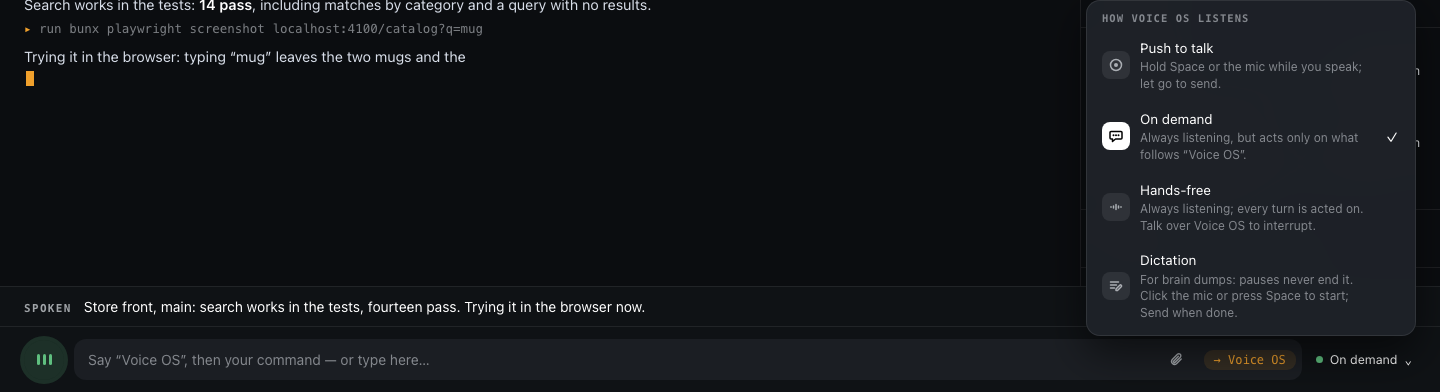
Hold Space and talk
"Run the tests." "What's waiting on me?" "Checkout, add a retry." The session on screen gets your words, a named one gets them from anywhere, and anything that needs you comes to you out loud.